The Button Behind My Monitor
During a five-month break from university, I spent most of my time at my desk. A few months in, my eyes started hurting enough that I could no longer pretend the monitor was fine.
Changing the brightness on my laptop took only a couple of clicks. The external monitor had a tiny joystick hidden around the back. I had to reach behind it, open the OSD, navigate through a page, adjust the brightness, and repeat the whole ritual whenever the light in my room changed. It was annoying, and I was also slightly convinced I would wear the button out.
Eventually I wondered whether the laptop could control it over HDMI. It could. DDC/CI lets a computer talk to a compatible monitor and change values such as brightness and contrast without touching the OSD at all.
There were already apps for this, so I installed one and assumed the problem was over. Then I opened Task Manager and saw it using more than 200 MB of memory.
I know 200 MB is not going to kill a modern laptop, but come on. This was a brightness slider. The tiny button behind my monitor could do the same job, yet its software replacement needed an entire Electron app sitting in the background all day.
That annoyed me more than the button did.
Two Hundred Megabytes of Spite
That is how xcreen started: partly because my eyes hurt, and partly out of spite.
I wanted it to launch with Windows, sit in the system tray, and use the laptop’s ambient light sensor to pick sensible brightness and contrast values when I asked. I did not want a dashboard, or a settings window that looked like a website. If I had to keep thinking about the app after setting it up, I had probably built it wrong.
It was also a suspiciously good excuse to properly learn Rust. I knew just enough C++ and Windows API code to make questionable decisions with confidence, so I went directly through the Windows APIs to discover monitors, speak DDC/CI, read the light sensor, and live in the tray.
Rust’s ownership model did force me to think differently once callbacks, threads, and Windows handles started meeting each other. Still, the borrow checker was rarely the monster people on Reddit warn you about. Most of the pain came from Windows being Windows. Rust was usually the part making me prove I had not done something stupid.
The first version did not have a normal application window at all. Everything lived in native tray menus: brightness presets, ambient adjustment, refresh, autostart, and exit. It was not glamorous, but that was part of the joke. The app complaining about a bloated brightness slider barely needed an interface of its own.
The One-Megabyte Phase
The first useful fully native build was a single xcreen.exe just under 1 MB. Going from a 200 MB app to that tiny executable was unnecessarily satisfying.
The number itself did not make xcreen better. Nobody has ever moved a brightness slider and thought, “Wow, I can really feel the small binary.” It mattered because it proved I had kept the original promise. This tiny background utility would not become another thing fighting for space and attention.
That early version was purposefully plain. It started with Windows, could set brightness and contrast from an ambient-light reading, and gave me a tray menu for the few times I wanted control. Later, I added better persistence and support for multiple monitors because personal tools have a habit of meeting new versions of your life. My one-monitor solution had to learn that a desk can change.
The Popup I Wanted
The latest version moves the interface to WinUI 3 through Rust bindings (yes, that’s a thing). Left-clicking the tray icon now opens a small flyout with the monitor name, brightness and contrast sliders, buttons to move between displays, and a one-click ambient-light adjustment along the bottom.
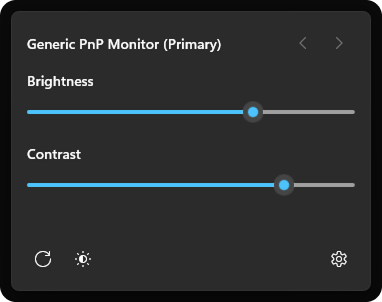
The fun part was not merely putting native sliders in a box. I wanted the whole thing to pass as a Windows popup: rounded system corners, an acrylic backdrop that picks up the wallpaper behind it, the spacing and icons Windows uses, and a border that does not announce itself. It appears beside the taskbar like the Wi-Fi or volume panel instead of opening as a normal application window.
That still required some low-level Win32 work to make the window behave like a flyout rather than a normal app. Underneath the pretty sliders, Rust is sending DDC/CI commands straight to the physical monitor.
I am quite proud of that combination. The first version was me flexing over how little software I could get away with. This one is me flexing over how “native” I could make it feel without leaving Rust.
More importantly, it is the interface I imagined when I first reached behind the monitor. I can click the tray icon, move a familiar Windows slider, and get on with whatever I was doing. No OSD. No giant background app. No awkward little joystick.
Most days I barely open the flyout. xcreen starts when I sign in, waits in the tray, and stays out of the way. I still click it occasionally because seeing my own native popup has not stopped feeling cool, but the rest of the time I forget it is there.
That may be the best lesson the project gave me. A personal tool does not need an endless feature list to justify itself. Sometimes its entire job is to remove one tiny irritation so completely that you stop remembering it was an irritation.
The code is on GitHub. I keep messing with it whenever I find another edge case in the very serious business of not reaching behind my monitor ;)